How should you choose cold email domain variations?
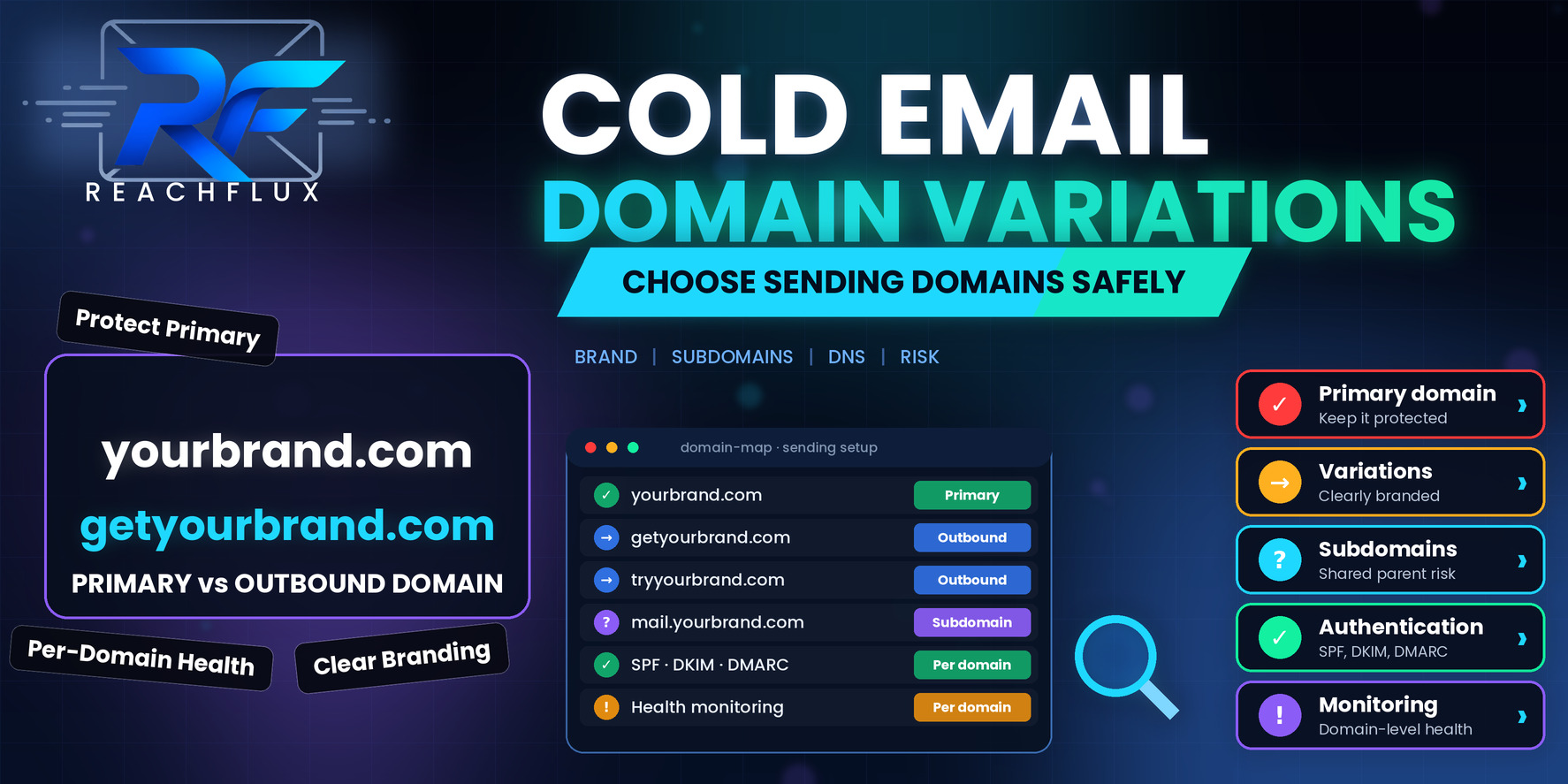
Choose domains that are clearly connected to your brand, easy for a recipient to recognize, and set up with full authentication before they send a single message. Use a modest variation of your own name, such as a short prefix or a different top-level domain, point the domain at a simple website or redirect, and monitor each domain separately.
The point of a variation is risk separation, not disguise. It keeps outbound activity away from your primary domain while still looking like what it is: your company, writing from a slightly different address.
Variations, subdomains and primary domains: the options
There are three common ways to separate outbound email from your main business address, and each has a different trade-off.
| Option | Example pattern | Strength | Watch out for |
|---|---|---|---|
| Primary domain | yourbrand.com | Highest recognition and trust with recipients | Outbound problems can affect the domain your whole business depends on |
| Separate variation domain | getyourbrand.com | Strong separation of reputation and risk | Needs its own DNS, website and monitoring; must be clearly branded |
| Subdomain | mail.yourbrand.com | Easy to manage and clearly part of your company | May be assessed in relation to the parent domain |
Most teams that run cold outreach at any real volume end up with separate variation domains, and keep the primary domain for normal business correspondence. That way, if one outbound domain runs into trouble, the damage is contained.
For the full comparison of these options, read Primary Domain vs Cold Email Domain: Which Should You Use for Outreach?.
How to name a variation so recipients recognize it
1. Keep your brand name intact
The strongest variations contain your exact brand name with one small, sensible addition: a short prefix such as get, try or hello, or a suffix describing what you do. A recipient glancing at the address should see your company name immediately.
Avoid anything that bends the name in ways that look like a typo or a trick. Replacing letters, adding hyphens in odd places or stacking extra words makes the domain harder to remember and easier to dismiss.
2. Choose a top-level domain you would be comfortable defending
A familiar extension like .com is usually the safest for recognition. Other extensions can be perfectly fine, and some are common in particular industries. The thing to check is the reputation of the extension itself. Some low-cost extensions have been heavily used for spam, and receiving systems and security tools sometimes treat them with more suspicion.
You do not need to be paranoid about this, but it is worth a quick look at how the extension is used before you build a campaign on it.
3. Never imitate another company
This deserves its own point because it is where legal and reputational trouble starts. A variation should always be your brand. Registering names that resemble another company's brand to borrow its trust is deceptive, can infringe trademarks, and tends to get flagged by recipients and security tools alike. It is also not necessary.
4. Make the link between domain and company obvious
Use the same display name and a signature that spells out your company, your role and your real website. If someone searches the sending domain, they should land on something that explains who you are. A recipient who cannot work out who is emailing them is a recipient who is more likely to report the message.
Set up each domain properly before it sends anything
5. Authenticate every domain individually
SPF, DKIM and DMARC must be configured and verified on each sending domain, not assumed from the setup of your main one. After setting them up, send test messages to your own accounts and read the authentication results in the headers. A record that exists in DNS is not proof that mail passes.
If you need a refresher on what each protocol does, see SPF vs DKIM vs DMARC: What Cold Email Senders Need to Know.
6. Give the domain a real web presence
A short landing page, or a redirect to your main site, makes the domain look like part of a real business. An empty domain with nothing behind it looks suspicious to the people who check, and some security tools look at that too.
7. Do not treat a new domain as ready on day one
A domain that has never sent mail has no sending history. The way you behave in the first weeks teaches receiving systems what to expect. Start conservatively, keep patterns consistent and increase gradually. Rushing a new domain to full volume creates exactly the abrupt pattern you were trying to avoid by separating it.
8. Decide the mailbox plan before you buy more domains
How many mailboxes will each domain host, and how much workload will each carry? Answering this first stops you buying domains by habit. If your target workload only needs a few well-used senders, a large pile of domains adds overhead without improving anything.
To size the whole setup from your campaign workload, use How Many Domains and Inboxes Do You Need for Cold Email Outreach?.
What a variation domain does not do for you
A variation separates risk. It does not create reputation from nothing, and it does not hide poor practice. These are the misconceptions we see most.
"A fresh domain will deliver better"
A domain with no history is a blank page. That is neutral, not positive. Receiving systems form their view from what you send, how recipients react and how consistently you behave. A well-run older domain with a clean record can be a better sender than a hurriedly launched new one.
"If one domain gets in trouble, I can just buy another"
Replacing a domain without finding out why it struggled usually reproduces the problem on the new one. If the cause was a poor list, weak targeting or a sudden volume spike, those causes travel with you. Use a variation to contain risk, not as a way to avoid fixing it.
"More domains means more safety"
Each extra domain needs authentication, monitoring and a plan for the mailboxes on it. Spreading the same weak campaign across ten domains simply gives you ten domains to worry about. Safety comes from quality and control, not from a high domain count.
If one of your domains has already slipped, the recovery process in Cold Email Domain Reputation: How to Protect It and Recover When It Drops will help you decide what to do before replacing anything.
Subdomain or separate domain: how to decide
This is the question teams argue about most, and the honest answer is that it depends on what you are protecting and how much outbound you plan to run.
A subdomain such as hello.yourbrand.com is obviously part of your company. Recipients understand it immediately and it is simple to manage under your existing DNS. The trade-off is that receiving systems and blocklists can evaluate reputation at the level of the organizational domain, so a serious problem on a subdomain may not stay neatly contained. A subdomain without its own DMARC record also falls back to the policy of the parent, which is worth knowing before you assume it is configured independently.
A separate variation domain gives you cleaner isolation. If it runs into trouble, your primary domain, which carries your invoices, support mail and customer conversations, is not part of the story. The cost is more setup, more records to maintain and a stronger need to make the branding obvious.
| Your situation | Lean toward | Reasoning |
|---|---|---|
| Primary domain handles customer, billing and support mail | Separate variation domain | Isolation matters more than convenience |
| Low outbound volume to senior buyers who will check the sender | Subdomain, kept conservative | Brand clarity is the priority and the volume carries limited risk |
| Higher volume across multiple senders | Separate variation domains | Workload and risk are easier to contain |
| Already had a reputation problem on the primary domain | Separate variation domains | Keep outbound away from a domain that is already struggling |
Whichever you choose, write down why. Six months from now, someone will ask why outbound runs from a particular domain, and a one-line answer saves a long discussion.
How to retire a sending domain without losing replies
Every outbound domain has a lifespan. Sometimes you outgrow it, sometimes it develops problems you decide not to chase, and sometimes you simply consolidate. What matters is how you wind it down.
Stop new campaigns first, so nothing fresh goes out. Then keep the mailboxes and MX records active for a sensible period afterwards, because replies often arrive days or weeks after the last message. Switching everything off immediately means real conversations bounce. Keep authentication records in place while any mail is still in flight, and leave the website or redirect running so recipients who check the domain still find your company.
Before you retire a domain because of poor performance, run the diagnosis. If the cause was a list, a template or a volume spike, record it and fix it, otherwise the next domain inherits the same fate. Retiring should be a decision, not a reaction.
Watch every domain as its own system
9. Track health per domain, not just in aggregate
An overall bounce rate can look acceptable while one domain is quietly struggling. Break your numbers out by sending domain and by mailbox. Look at hard bounces, temporary deferrals, authentication results and reply rates for each one. When a problem appears, you want to know within a day which domain carries it.
Keep a short record for every domain: when it was registered, when authentication was verified, when sending started, how workload has changed and any incident that occurred. It costs very little to maintain, and it saves hours when you are trying to work out why something changed.
- Every sending domain has verified SPF, DKIM and DMARC.
- Each domain points to a simple website or a redirect.
- Display names and signatures clearly identify your company.
- No domain imitates another company's brand.
- Workload per domain and per mailbox is documented.
- Bounce, deferral and reply data is visible per domain.
- There is a written rule for pausing a domain.
- The primary domain is not used for cold outreach.
ReachFlux manages sender accounts and workload distribution across domains in one place, so you can see how outreach is spread rather than guessing from separate mailbox dashboards. As with any outbound system, good structure supports deliverability but does not guarantee it.
Questions about cold email domain variations
What is a cold email domain variation?
It is a separate domain, usually close to your brand name, that you use for outbound email instead of your primary company domain. Examples include adding a prefix such as get or try, or using a different top-level domain. The goal is to keep outbound sending risk away from the domain your customers, staff and invoices depend on.
Should I use a subdomain or a separate domain for cold email?
A separate domain gives stronger isolation, because its reputation is not tied to your main domain. A subdomain is simpler to manage and looks more obviously like your company, but receiving systems may evaluate it in relation to the parent domain. Which is better depends on how much isolation you need and how clearly you want to show brand ownership.
Does a brand-new domain deliver better than an old one?
Not automatically. A new domain has no history, which means it has no bad history, but it also has no good history. Reputation comes from how you behave once you start sending. A new domain used carelessly can perform worse than an established one used well.
Is it safe to register domains that look like another company's brand?
No. Variations should be tied clearly to your own brand. Registering names that imitate another company can create trademark problems and looks deceptive to recipients. Use your own name, with a modest prefix or suffix, and make the connection obvious.
Do cold email domains need a website?
It is strongly recommended. Recipients often check the sending domain before they reply. A simple page or a redirect to your real site makes the domain look legitimate and connects it clearly to your company.
How many variation domains do I need?
It depends on your total daily workload and how many mailboxes each domain should host. Work that out from your actual sending volume rather than using a fixed formula. More domains add overhead, and each one needs authentication and monitoring.
Choose domains you could explain to a recipient.
The best cold email domain is boring. It contains your brand, it points to a real website, it authenticates properly and it behaves consistently. It does not try to look like something it is not.
Treat each variation as its own small system with its own health record, and keep your primary domain out of the line of fire. Do those things and the number of domains becomes a capacity question, which is much easier to answer.
Manage sender accounts and workload across your sending domains in one workflow.
ReachFlux helps teams run multi-domain outreach with clearer visibility into how workload is distributed.