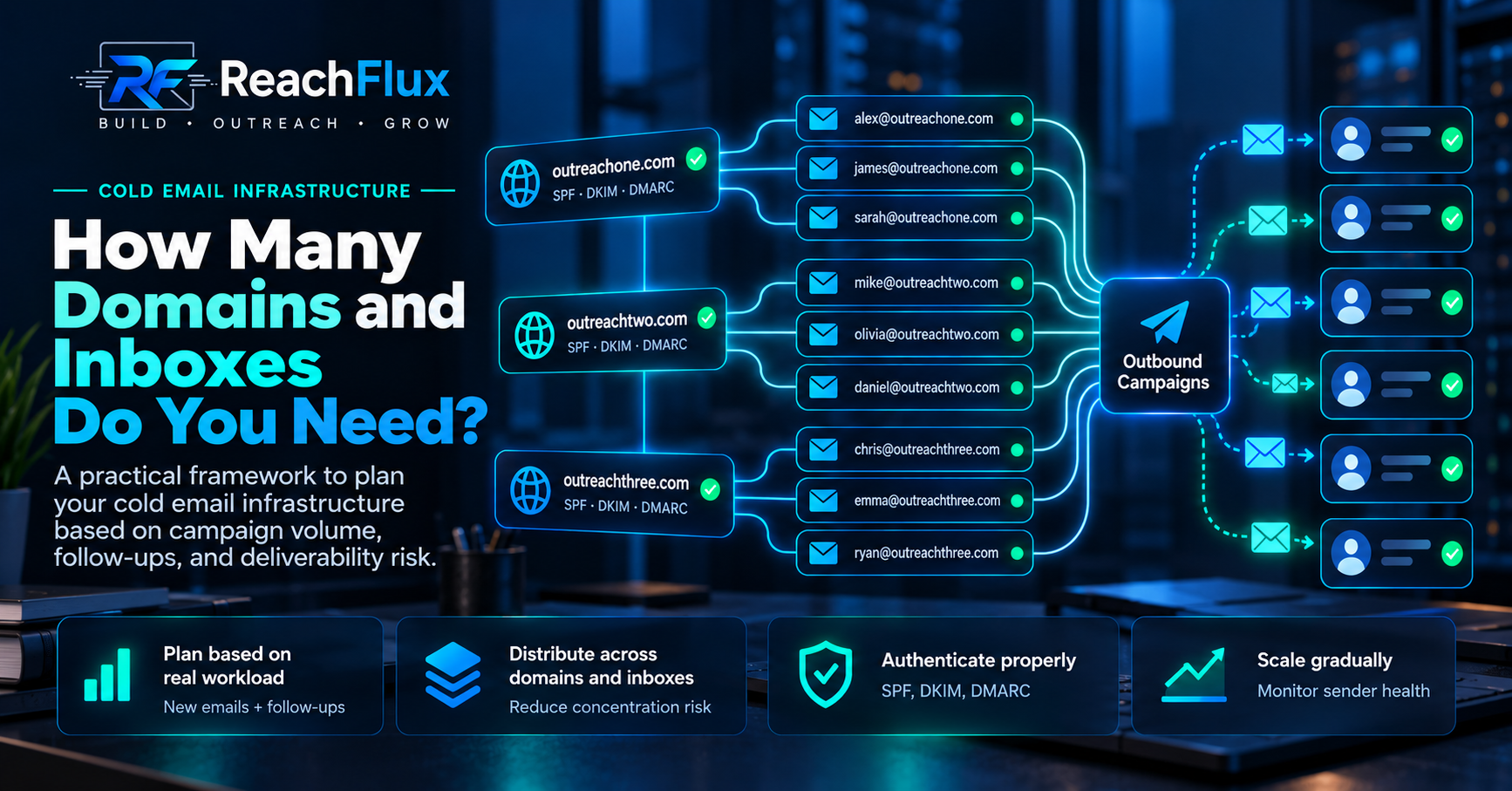
The number of domains and inboxes you need for cold email depends on your total daily sending workload, the capacity you choose for each sending account, the number of follow-ups in your sequence, and how much infrastructure concentration you are willing to accept.
There is no universal mailbox-provider rule saying every cold email domain should have exactly two, three, or five inboxes.
There is also no universal daily volume that makes every mailbox safe.
That means the useful question is not:
A better question is:
Once you know that, the domain and inbox requirements become much easier to reason about.
How many domains and inboxes do you need for cold email?
Start by calculating the number of messages your campaign needs to send on an ordinary day.
That means counting both:
Next, decide what operating capacity you are comfortable assigning to each inbox.
Then:
Notice the wording: planned capacity.
It is an operating decision, not a universal deliverability limit.
Your actual capacity depends on factors such as provider rules, sending history, recipient quality, domain reputation, message quality, bounces, complaints, and provider responses.
After estimating the inbox count, you can decide how those inboxes should be distributed across sending domains.
Calculate infrastructure from workload instead of calculating workload from the number of inboxes you happen to own.
Sending domain vs sending inbox: what is the difference?
Domains and inboxes are related, but they are not interchangeable.
Understanding the difference matters before you design any multi-account outreach setup.
outreach-example.com
The domain is the identity under which email addresses exist and where DNS authentication is configured.
alex@outreach-example.com
An inbox is an individual sending account attached to that domain and its mailbox provider.
One domain can support multiple inboxes.
But adding another inbox does not create a completely independent domain identity.
The addresses still share the same parent sending domain.
That is why infrastructure planning has two dimensions:
Mailbox capacity: how traffic is distributed between individual sending accounts.
Domain concentration: how much of your outreach depends on the same sending domain.
How to calculate the number of cold email inboxes you need
Start with your target campaign activity.
Imagine you want to introduce 300 new prospects per working day.
That does not automatically mean your infrastructure only needs to support 300 emails.
Once follow-ups become due, the workload increases.
For illustration, suppose your sequence eventually produces an average workload of 600 total messages on an ordinary day.
Now assume, purely for planning, that you have chosen an operating target of 30 messages per inbox per day.
The calculation becomes:
That does not mean 30 emails per day is an official safe limit.
Change the operating assumption and the infrastructure requirement changes with it.
| Daily workload | Planning assumption per inbox | Calculated inboxes |
|---|---|---|
| 600 | 20/day | 30 |
| 600 | 30/day | 20 |
| 600 | 40/day | 15 |
These figures demonstrate the calculation only. They are not universal recommended sending limits.
Do not forget follow-ups when calculating inbox capacity
This is one of the easiest infrastructure mistakes to make.
A team calculates how many new prospects it wants to contact each day and buys enough inboxes for that number.
Then the sequence starts generating follow-ups.
Suddenly, the infrastructure must handle both today's new prospects and previous prospects reaching later sequence steps.
This is why your steady-state workload can be significantly larger than your daily new-prospect count.
Before scaling, model the whole sequence.
Ask:
Capacity planning from the mature campaign state is more useful than planning from day one.
How many cold email inboxes should you use per domain?
There is no universal number.
You will often see advice online that says every sending domain should contain a fixed number of inboxes.
That can be useful as someone's internal operating rule.
It should not be confused with an official Gmail, Outlook, or Yahoo requirement.
The better way to think about inboxes per domain is concentration.
Suppose you need 20 sending inboxes.
You could theoretically arrange them in several ways:
Those structures do not have identical operational characteristics.
Putting every inbox under one domain concentrates more of the campaign's identity under that domain.
Spreading inboxes across more domains reduces that concentration, but adds DNS configuration, monitoring, renewals, authentication, and operational complexity.
So the goal is not:
“Use as many domains as possible.”
The goal is to choose an architecture that gives your campaign enough capacity without creating unnecessary concentration or unnecessary complexity.
Why do larger cold email systems use multiple sending domains?
Multiple domains can separate parts of your outbound infrastructure.
That can make it easier to organize sending accounts, isolate problems, and avoid making every outbound mailbox dependent on a single domain.
But there is an important misconception here.
More domains do not make bad outreach good.
If recipient targeting is poor, messages are unwanted, addresses are invalid, or complaints rise, buying more domains does not fix the underlying problem.
The same applies to authentication.
Ten poorly configured domains do not create better infrastructure than two properly managed domains.
Every sending domain still needs to be treated as real email infrastructure.
Example cold email infrastructure architectures
The following examples are deliberately illustrative.
They show how the planning process changes as campaign workload grows. They are not prescriptions for how many emails every business should send.
Small outbound test
A founder is testing one narrow audience and does not yet know whether the offer will produce meaningful replies.
At this stage, building a large mailbox network before validating the campaign may create cost and complexity without solving the actual problem.
Growing sales operation
The team has a working offer, understands its audience, and needs more campaign capacity.
This is where multi-account distribution becomes more useful. The team should calculate steady-state sequence workload before adding accounts.
Larger outbound operation
The system handles multiple campaigns, larger prospect lists, and significant follow-up traffic.
At this level, the operational challenge is not merely adding accounts. It is monitoring distribution, authentication, bounces, replies, provider responses, and domain health while volume grows.
Should you send cold email from your primary company domain?
This decision deserves more attention than it usually gets.
Your primary company domain may also support:
- employee communication,
- customer support,
- invoices and account messages,
- password resets,
- partnership conversations,
- and other business-critical email.
Mixing business-critical communication with higher-risk outbound prospecting creates concentration.
Google itself recommends separating different categories of messages where appropriate, including using different IP addresses for different message types when multiple IPs are necessary.
Yahoo similarly recommends separating bulk or marketing traffic from user, transactional, and alert traffic.
The exact infrastructure will depend on your mail provider and sending setup, but the underlying principle is useful:
Do not create unnecessary dependency between critical company email and outbound prospecting traffic.
Every sending domain needs proper email authentication
Adding domains increases configuration work.
Each sending domain needs to be configured correctly rather than treated as a disposable address container.
At minimum, understand:
Identifies which systems are authorized to send on behalf of the domain.
Adds a cryptographic signature that receiving systems can verify.
Builds on SPF/DKIM and alignment while providing policy and reporting controls.
Gmail requires SPF or DKIM for all senders to Gmail accounts and requires SPF, DKIM, and DMARC for senders above its bulk-sender threshold.
Yahoo also requires SPF or DKIM for all senders, with SPF, DKIM, and DMARC requirements for bulk senders.
Even if your current volume is far below those bulk thresholds, authentication should be part of the infrastructure from the beginning.
Where does cold email inbox rotation fit?
When a campaign has several sending accounts, the system needs a way to distribute work between them.
That is where inbox rotation or multi-account distribution enters the architecture.
Conceptually:
Distribution can prevent one account from carrying the entire campaign workload.
But rotation is a capacity mechanism.
It is not a reputation repair mechanism.
If a domain starts producing poor results, shifting more traffic between inboxes on that same domain does not diagnose the cause.
What should you do when one inbox starts struggling?
Do not immediately assume you need another inbox.
First identify what is actually happening.
Look at:
Are invalid recipients or provider rejections increasing?
Is the provider asking you to slow down?
Are SPF, DKIM, and DMARC behaving as expected?
Did sending activity suddenly increase?
Did list quality or audience targeting change?
Is the issue larger than one individual mailbox?
Google recommends reducing volume when messages begin bouncing or being deferred, then increasing gradually after SMTP error rates fall.
That is a much better diagnostic response than blindly adding more accounts and continuing the same behavior.
CONTINUE READING Your Cold Email Domain Has a Reputation. Here’s How to Protect It. → Learn what can damage domain reputation, how to diagnose a decline, and when recovery makes more sense than replacing the domain.How should you scale domains and inboxes?
Scaling should follow demand.
Not the other way around.
A useful sequence is:
Confirm that the audience and offer produce useful conversations.
Calculate real sequence workload, including follow-ups.
Add sending capacity where workload actually requires it.
Monitor bounces, replies, errors, and domain health.
Increase capacity without creating sudden traffic spikes.
Google explicitly recommends gradual volume increases and consistent sending rather than sudden bursts.
It also recommends monitoring server responses, spam rate, and domain reputation as sending grows.
So adding 20 new inboxes does not mean all 20 should immediately be pushed to your planned operating level.
Infrastructure growth and traffic growth are related, but they are not the same event.
How ReachFlux handles multiple sending accounts
Once outreach uses several inboxes, manually deciding which account sends every recipient becomes unnecessary operational work.
ReachFlux supports multiple connected sending accounts and distributes campaign recipients between them.
Each account can also use its own signature, while campaign processing happens through background queues.
That helps separate two decisions:
The software can distribute workload.
It cannot make poor recipient data, weak targeting, or damaged sender reputation disappear.
Infrastructure still needs to be planned and monitored.
Cold email domains and inboxes planning checklist
Define how many new prospects you want to contact per day.
Calculate the follow-up traffic your mature sequence will create.
Add new emails and follow-ups to estimate total daily workload.
Choose an operating capacity per inbox based on your own infrastructure and observed sender health.
Divide total workload by that operating assumption to estimate the inbox requirement.
Decide how much domain concentration you are comfortable with.
Configure SPF, DKIM, and DMARC correctly for every sending domain.
Avoid creating unnecessary dependency between business-critical email and outbound prospecting.
Distribute workload across accounts instead of pushing one mailbox simply because capacity exists elsewhere.
Increase volume gradually and monitor provider responses, bounces, complaints, and reputation.
Frequently asked questions
How many domains are needed for a cold email outreach campaign?
There is no universal number. Start with total campaign workload, estimate the inbox capacity you need, then decide how much of that infrastructure you want concentrated under each sending domain.
How many inboxes should I create per cold email domain?
Mailbox providers do not publish a universal rule requiring a fixed number of cold outreach inboxes per domain. Treat inboxes-per-domain as an infrastructure and risk-distribution decision rather than a magic deliverability formula.
Can I send cold email from one inbox?
A small campaign may operate with one sending account if its workload fits that account and provider rules. As campaign workload grows, multiple accounts can distribute traffic rather than concentrating all activity in one mailbox.
Does adding more inboxes improve deliverability?
Not automatically. More inboxes add capacity. Deliverability still depends on authentication, recipient quality, sender reputation, message quality, provider responses, complaints, bounces, and sending behavior.
Should every sending domain have SPF, DKIM, and DMARC?
Proper authentication should be part of each sending domain's setup. Gmail and Yahoo have explicit authentication requirements, with stronger requirements applying to bulk senders.
Do follow-ups count toward cold email sending volume?
Yes. A follow-up is another outgoing message. Infrastructure planning should therefore account for both new prospect emails and follow-ups that become due from earlier sequence steps.
Is inbox rotation enough to protect domain reputation?
No. Rotation distributes traffic between accounts. It does not repair weak targeting, invalid recipient data, authentication problems, complaints, or damaged domain reputation.
Do not start with a magic number of domains or inboxes. Start with the workload your campaign needs to handle. Include follow-ups, choose a reasonable operating assumption for your own sending accounts, distribute the resulting capacity, and expand gradually while monitoring sender health.
More sending capacity should mean better distribution, not uncontrolled volume.
ReachFlux helps teams manage campaigns across multiple sending accounts while keeping replies, lead activity, tracking, and campaign operations in one workflow.