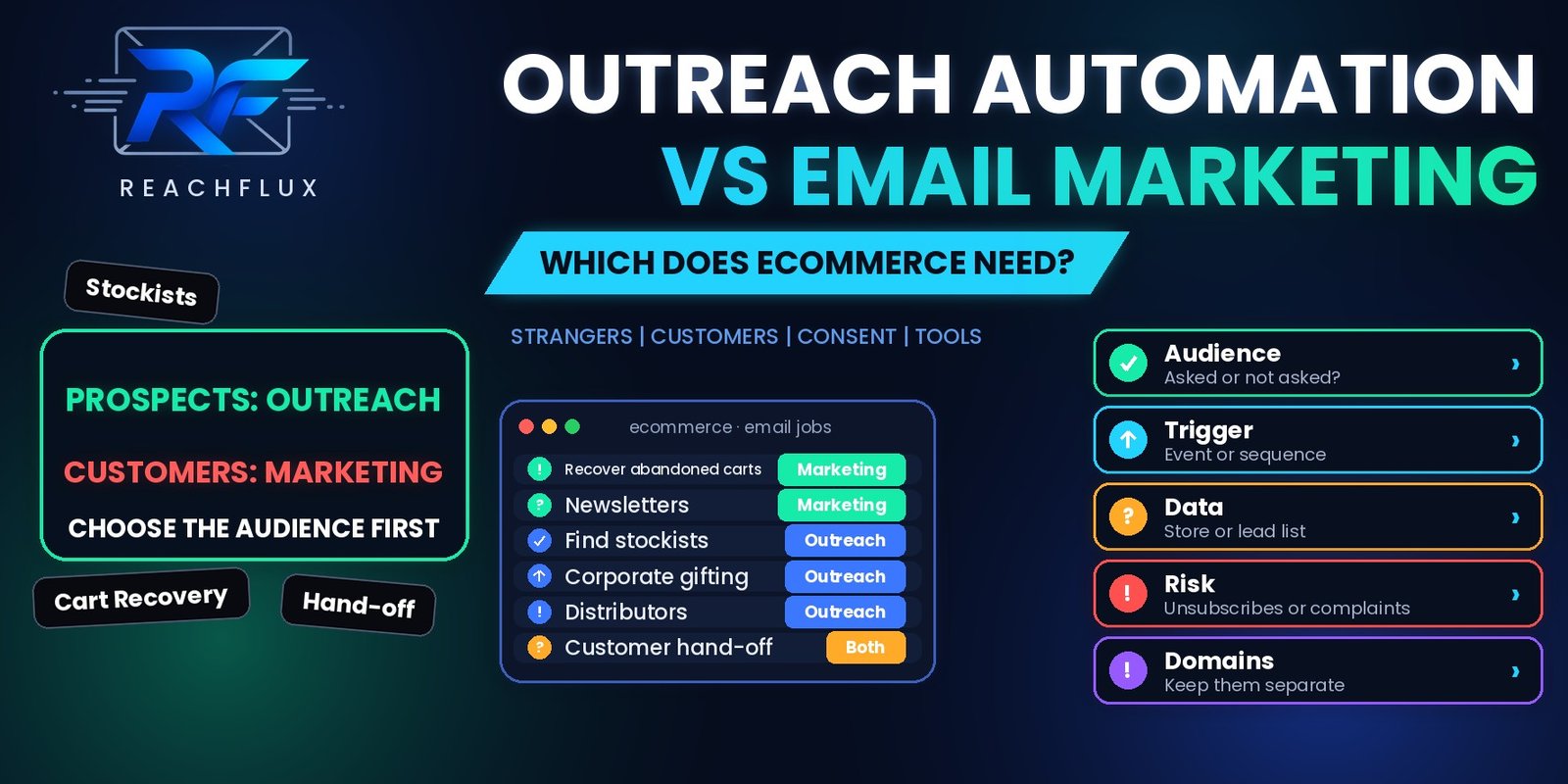
What is the difference between lead outreach automation and email marketing automation?
Email marketing automation sends messages to people who already have a relationship with you, usually customers and subscribers, triggered by what they do in your store or on your site. Lead outreach automation starts conversations with businesses or people who do not know you yet, using lead lists, sender accounts, pacing, follow-ups and reply management. They share the word “email” and almost nothing else.
An ecommerce business may need one, the other or both. If your goal is repeat purchases, recovered carts and loyalty, you need marketing automation. If your goal is retailers, distributors, corporate buyers or partners, you need outreach automation. Choosing the wrong category is the most common reason ecommerce teams end up frustrated with their email tools.
Find your situation
Most teams can answer this in a minute. Match your goal to the right-hand column.
| Your situation | What you need |
|---|---|
| Recover abandoned carts and nudge repeat purchases | Email marketing automation connected to your store |
| Send newsletters and product launches to subscribers | Email marketing automation |
| Welcome new customers and send order or shipping flows | Email marketing automation |
| Find stockists, retailers or distributors who do not know you | Lead outreach automation |
| Approach corporate buyers for gifting or bulk orders | Lead outreach automation |
| Pitch partnerships, co-brands or marketplace channels | Lead outreach automation |
| Do both | Both, kept separate, with a clear hand-off between them |
Six differences that change how you work
The relationship
Marketing automation talks to people who bought or signed up. Outreach talks to people who did not ask to hear from you, so relevance, restraint and a clear opt-out matter far more.
The trigger
Marketing flows fire on events such as a cart abandoned or an order shipped. Outreach runs on sequences that you schedule, with follow-ups that stop when someone replies.
The data
Marketing uses data from your own store. Outreach needs a lead list you source and validate yourself, which is where most outreach success or failure begins. See Why Do Half of Your Prospect Emails Bounce? Fixing Bad Data From Paid Databases and LinkedIn.
The infrastructure
Marketing email usually goes out through the platform’s own sending setup. Outreach often runs through connected mailboxes on dedicated domains, with volume limits and rotation. See Cold Email Infrastructure: Domains, Inboxes, DNS and Sending Limits.
The measure of success
Marketing is measured in revenue per recipient. Outreach is measured in qualified replies, meetings and first orders.
The risk
Marketing’s main risk is over-mailing your own customers. Outreach’s main risk is complaints, bounces and a damaged sender reputation, which can follow you for months.
What goes wrong when the categories get mixed up
Using a customer-marketing tool for cold prospects
Those tools are built around store events and subscriber consent. Pushing unsolicited outreach through them risks complaints that harm the same sending reputation your customer emails depend on.
Using an outreach tool for your customers
Outreach tooling is not built for store-triggered flows, preference centres or revenue attribution, so it does a poor job of what marketing automation does well.
Running outreach from the store’s main domain
A problem with outreach then affects order confirmations and receipts. Use dedicated domains. See Primary Domain vs Cold Email Domain: Which Should You Use for Outreach?.
Expecting one tool to do both well
A single product can cover some of both, but depth usually favours one side. Judge it on the job you care about most.
Skipping the rules because “it is only email”
Consent and opt-out expectations differ between the two. Check the rules for your market, and see Cold Email Compliance and Deliverability: Opt-Outs, Sender Identity and Complaint Rates.
How the two work together
The healthiest setups keep the categories separate and connect them with a deliberate hand-off. Outreach opens the conversation with a wholesale or partner prospect. When that prospect becomes a customer or an account, the relationship moves into your regular customer communications, with the consent and preferences that go with it.
Keeping them apart protects both sides. Your outreach domains carry outreach risk, your store domain carries customer trust, and neither contaminates the other. The wholesale version of this workflow is laid out in How to Email Retail Buyers and Stockists: A Wholesale Outreach Playbook for Ecommerce Brands.
Four illustrative scenarios and what each needs
These are hypothetical situations, included to make the distinction concrete.
A skincare brand that wants independent retail stockists
This is outreach. The brand needs a list of independent shops, a short wholesale pitch and follow-ups, sent from dedicated domains. A store-connected marketing tool will not help here.
A fashion brand with many abandoned carts
This is marketing automation. The recipients are people who visited the store, so event-triggered flows connected to the shop are the right tool.
A food brand launching a corporate gifting range
This is outreach first, then a hand-off. Outreach opens conversations with corporate buyers, and once an account is won the relationship moves into regular customer communications.
A marketplace seller looking for regional distributors
This is outreach. The seller needs a targeted list of distributors and a message about range fit and terms, with replies handled carefully.
What to look for in each category
Once you know the category, the shortlist is easier to judge. These are the features that matter most on each side.
| Marketing automation | Outreach automation |
|---|---|
| Store integration and event triggers | Lead list import and validation |
| Segments built from purchase behaviour | Sending across several connected accounts |
| Templates, flows and a preference centre | Pacing, delays and variation controls |
| Revenue attribution and lifecycle reports | Follow-ups that stop on reply |
| Subscriber consent and list management | Reply management and a lead pipeline |
The full set of questions for the outreach side, with the reasoning behind each, is in Outreach Automation for Ecommerce Brands: What to Look For and How to Keep Follow-Ups Consistent.
Where ReachFlux sits
ReachFlux is on the outreach side. Its ecommerce page describes it as built for contacting prospective retailers, distributors, resellers and corporate buyers by email, working from lead data you already own, with CSV and Excel import, email validation, sending across connected accounts, randomised delays, AI-assisted drafting, reply handling and a lead pipeline.
It does not replace your store, your cart-recovery flows or your customer-marketing system, and it does not supply a buyer database. If you need those things, you need a marketing automation tool alongside it.
Different jobs deserve different metrics
Using the wrong yardstick makes good work look bad. Marketing automation is judged by revenue per recipient, conversion rate from flows, list growth and unsubscribe rate. Outreach is judged by qualified replies, positive replies, meetings booked and first orders. Opens and clicks are weak supporting signals in both, and less reliable in outreach because gateways and privacy features distort them.
If you track the two together in one dashboard, label them clearly. A low reply rate on outreach is normal and may still be a success, while a low conversion rate on cart recovery is a warning sign. See Cold Outreach Conversion Rates Dropping? How to Diagnose the Funnel From Sent to Booked for how to read outreach numbers.
A simple way to decide this week
For example, “recover abandoned carts” or “find ten independent retailers”. The sentence tells you the category.
Customers and subscribers point to marketing automation. Strangers who might become buyers point to outreach.
Make sure you know what your market expects for each audience before you build anything.
Pick the category first, then compare tools within it using the lists above.
Use dedicated domains for outreach so customer email stays protected.
Myths about ecommerce email automation
“Automation means I never write emails”
Automation handles scheduling and sending. You still decide the audience, the offer and the wording, and you read replies.
“More emails always means more sales”
Both categories punish over-sending, through unsubscribes in one case and complaints and reputation damage in the other.
“Cold outreach is just a bigger newsletter”
It is a different activity with different consent expectations, tooling and risks.
“A single tool will cover everything”
Possibly partly, but depth usually favours one side. Pick by the job that matters most.
Designing the hand-off from outreach to customer communications
The moment a prospect becomes a customer is where the two systems meet, and it deserves a deliberate design. Without one, new accounts either keep receiving outreach follow-ups or fall into a void where nobody communicates with them.
The moment a prospect agrees to buy or becomes an account, remove them from all outreach sequences.
Note the source, the buyer type and what worked, so you can improve targeting.
Add them to your customer system with the right preferences and consent for what you will send.
One person owns the account relationship, so replies do not scatter.
Use customer data to plan the next conversation, rather than returning to cold outreach.
This keeps outreach for starting conversations and customer communications for sustaining them, which is how each tool does its best work. For the outreach side of the workflow, see How to Email Retail Buyers and Stockists: A Wholesale Outreach Playbook for Ecommerce Brands.
Category checklist
- You have written the goal in one sentence and know who receives the email.
- You know whether recipients asked to hear from you.
- Marketing email and outreach email use separate domains and sending setups.
- The outreach list is validated and appropriately sourced.
- You know the consent and opt-out expectations for each audience.
- You have chosen tools by the job they do best.
- A hand-off from outreach to customer communications is defined.
Questions about outreach and marketing automation
What is the difference between lead outreach automation and email marketing automation?
Email marketing automation sends triggered or scheduled messages to customers and subscribers who already have a relationship with you. Lead outreach automation starts conversations with prospects who do not know you yet, using lead lists, sender accounts, pacing, follow-ups and reply management.
Which does an ecommerce business need?
It depends on the goal. Repeat purchases and recovered carts need marketing automation. Finding retailers, distributors, corporate buyers or partners needs outreach automation. Many businesses need both, kept separate.
Can I use my newsletter tool for cold outreach?
It is usually a poor fit. Those tools are built around subscriber consent and store events, and unsolicited outreach through them can cause complaints that harm your customer email reputation.
Can one tool do both lead outreach and email marketing?
Some products cover parts of both, but depth usually favours one side. Judge a tool on the job that matters most to you.
Do I need a separate domain for outreach?
Usually yes. A dedicated outreach domain keeps bounce and complaint risk away from the domain that sends order confirmations and customer email.
Is ReachFlux an email marketing tool?
No. ReachFlux is built for B2B outreach, such as contacting retailers, distributors and corporate buyers. It does not replace store-connected marketing automation.
Choose the audience first. The tool follows.
Customers and subscribers belong in marketing automation. Strangers who might become wholesale buyers, partners or corporate accounts belong in outreach. Keep the two separate, protect your sending reputation, and connect them with a clear hand-off.
Once the category is clear, the shortlist usually shrinks to a handful of tools worth testing.
Prepare leads, run campaigns and continue buyer conversations in one place.
ReachFlux helps ecommerce brands run structured B2B outreach to retailers, distributors and partners.