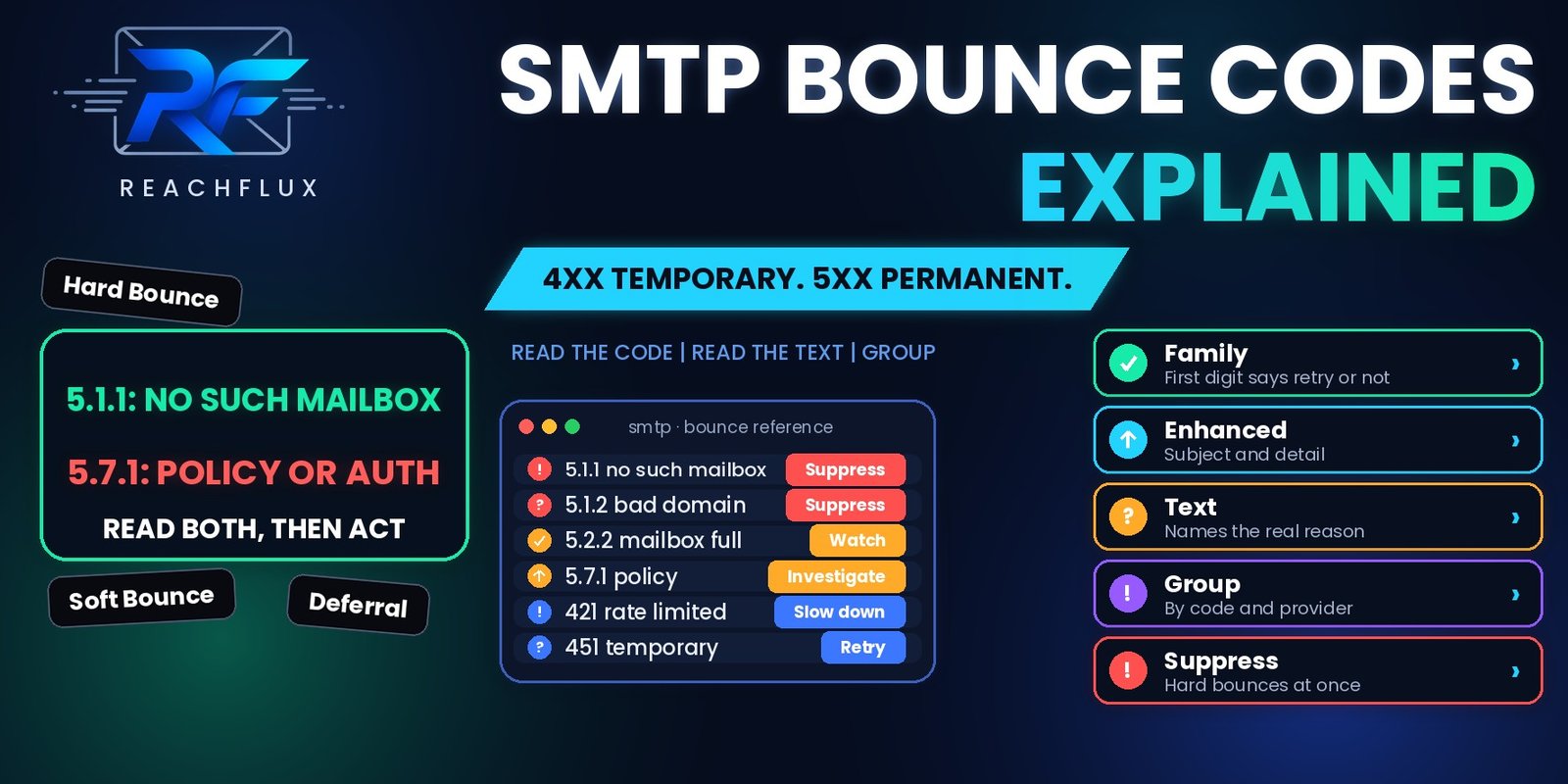
What do SMTP bounce codes mean?
SMTP bounce codes are the numbers a receiving mail server returns when it does not accept your message. Codes beginning with 4 mean a temporary problem, so the sender may retry. Codes beginning with 5 mean a permanent rejection, so retrying will not help. The text that comes with the code often says why, and the three-part enhanced code, such as 5.1.1, gives a more specific category.
For cold email, the useful skill is not memorising every code. It is reading the family, reading the accompanying text, and deciding whether the problem is the address, the recipient’s server, your reputation or your authentication. This reference covers the codes you will see most, what they usually mean and what to do. Providers word their messages differently, so always read the full text.
The first digit tells you what kind of problem it is
| Starts with | Meaning | What to do |
|---|---|---|
| 4 (for example 421, 450, 451, 452) | Temporary failure; the server may accept the message later | Let your system retry, but watch for patterns that signal throttling or reputation problems |
| 5 (for example 550, 552, 553, 554) | Permanent failure; the message was rejected | Do not retry. Treat the address as a hard bounce or fix the cause such as authentication |
How to read a code like 5.1.1
Enhanced status codes have three numbers. The first matches the family: 2 means success, 4 means a persistent temporary failure and 5 means a permanent failure. The second number gives the subject, such as the address, the mailbox, the network or security and policy. The third gives the detail. So 5.1.1 is a permanent failure, concerning the address, with the specific detail that the destination mailbox does not exist.
Servers usually show the basic three-digit code, the enhanced code and a human-readable message together. Read all three. The message often includes the provider’s own explanation and sometimes a link to their guidance.
Common 5xx codes and what to do
Permanent failures are the ones that hurt reputation fastest, because they say you are sending to addresses that cannot receive your mail or that the recipient does not accept. Meanings vary a little by provider, so use this as a guide.
| Code | Usually means | What to do |
|---|---|---|
| 5.1.1 | The mailbox does not exist or the address is wrong | Remove the address and review where it came from. See Why Do Cold Emails Bounce? 15 Reasons and How to Fix Them |
| 5.1.2 | The recipient domain does not exist or cannot be found | Remove the address and check for typos or dead domains |
| 5.2.1 | The mailbox is disabled or not accepting mail | Treat as invalid and suppress it |
| 5.2.2 | The mailbox is over its storage quota | It may clear later, but treat repeated cases with caution |
| 5.4.x | A routing or network problem delivering to the domain | Check the domain and retry cautiously; repeated cases suggest an unusable domain |
| 5.7.1 | Delivery refused for policy, authentication, reputation or relay reasons | Read the text carefully, then check authentication, blocklists and sending behaviour |
| 5.7.x (other) | Policy, security or authentication rejections of various kinds | Compare against your authentication results and reputation signals |
Common 4xx codes and what they warn you about
Temporary failures are easy to ignore because the message may be delivered on retry. But patterns of them are an early warning. A provider that keeps deferring your mail is often telling you something about volume, reputation or authentication.
| Code | Usually means | What to do |
|---|---|---|
| 421 or 4.7.0 | The server is temporarily refusing connections or limiting you, often for rate or reputation reasons | Slow your sending to that provider and check reputation signals |
| 450 or 4.2.1 | The mailbox is temporarily unavailable | Retry later; if it repeats, treat the address with suspicion |
| 451 or 4.7.1 | A temporary local problem or a greylisting-style delay | Retries often succeed; repeated deferrals deserve investigation |
| 452 or 4.2.2 | The mailbox is full | It may clear in time, but this is not a reliable recipient |
| 4.4.x | A network or routing problem | Usually transient, but check if it persists for one domain |
Words in the message that point to a cause
Words about the address or user
Phrases such as user unknown, no such user or recipient rejected point to an invalid address, which is a list problem. See Cold Email Bounce Rate: What’s Too High, Why It Happens & How to Reduce It.
Words about authentication or policy
Mentions of SPF, DKIM, DMARC, unauthenticated or sender policy point to your DNS and alignment. See SPF vs DKIM vs DMARC: What Cold Email Senders Need to Know.
Words about reputation or blocklists
Phrases about poor reputation, blocked sender or listing point to your sending history, so check domain and IP reputation.
Words about rate or volume
Mentions of too many messages, rate limits or unusual activity point to pacing. Slow down and spread volume.
Words about content or spam
Phrases about suspected spam or content rejection point to your message, links or attachments.
Words about the mailbox
Over quota, disabled or inactive point to the recipient’s mailbox rather than to you.
A triage routine for bounces
Counting bounces alone hides patterns. A cluster of one code at one provider points to a specific cause.
Address bounces are a list problem. Policy and authentication rejections are an infrastructure or reputation problem.
Add every permanent address failure to your suppression list so no campaign emails it again.
A rise in deferrals to one provider is an early warning to slow down.
Check authentication, reputation, list source and pacing, and note what you changed. The broader map is in the Cold Email Deliverability: The Complete Guide to Inbox Placement, Reputation and Fixes.
How codes connect to your bounce rate
A rising bounce rate can come from very different causes, and the codes tell you which. A rise in 5.1.1 errors points to a poor or old list. A rise in 5.7.x errors points to policy, authentication or reputation. A rise in 4xx deferrals points to volume or reputation pressure. Treating all of these as one number leads to the wrong fix.
Keep a simple table of bounces by code family, provider and list source, and review it weekly. The routine in Cold Email Monitoring and Alerts: What to Watch So Campaigns Never Stop Silently shows how to turn that into alerts.
Reading a typical bounce message
Consider a bounce that says, in effect: 550 5.1.1 The email account that you tried to reach does not exist. Here is how to read it. The leading 5 means a permanent failure, so there is no point retrying. The 550 is the basic code, and the enhanced code 5.1.1 narrows it down: the problem concerns the address, and the specific detail is that the mailbox does not exist. The text confirms it.
The action is clear: suppress that address and look at where it came from. If many bounces in a campaign carry the same code from one list source, the source is the problem. If instead you saw a 5.7.1 with words about authentication or policy, the action would be completely different: check your SPF, DKIM, DMARC and sending reputation. The same number of bounces can mean two very different problems, which is why you read the code and the text.
Mistakes when handling bounces
Retrying permanent failures
It wastes sends and signals poor list hygiene to the receiving server.
Ignoring temporary failures
Patterns of deferrals are among the earliest warnings of reputation trouble.
Treating every 5xx as an invalid address
Many 5.7.x errors are about policy or authentication, not the address itself.
Not suppressing hard bounces
The same addresses keep getting emailed, and reputation suffers.
Reading only the code and not the text
The message often names the exact reason.
Providers word the same problem differently
Different mailbox providers use their own phrasing, and some add links to their own help pages. The same underlying cause, such as an unauthenticated message or a rate limit, may appear with different codes and wording depending on who rejected it. Do not expect a perfect one-to-one match with any table, including this one.
The practical approach is to collect real bounce messages from your own campaigns, group them by provider, and build a short internal reference of what each one has meant in your experience. Over time that becomes more useful than any generic list, and it feeds directly into the monitoring routine in Cold Email Monitoring and Alerts: What to Watch So Campaigns Never Stop Silently.
A simple bounce dashboard worth keeping
You do not need elaborate tooling to learn from bounces. A weekly table with a few columns is enough, as long as the columns never change.
| Column | Why it helps |
|---|---|
| Week and campaign | Lets you compare like with like |
| List source | Shows which sources produce invalid addresses |
| Provider | Reveals provider-specific problems |
| Code family and enhanced code | Separates address problems from policy and reputation issues |
| Count and share of sends | Shows scale as well as type |
| Action taken | Records whether you suppressed, slowed or fixed something |
Review it alongside replies and complaints. When a column changes, ask what you did that week. Often the answer is already in your change log.
Bounce handling checklist
- Hard bounces are suppressed automatically after the first permanent failure.
- Bounces are grouped by code family, provider and list source each week.
- Policy and authentication rejections trigger a check of DNS and reputation.
- Deferrals to one provider trigger a slowdown for that provider.
- The full bounce text is stored and read, not just the code.
- List sources producing many invalid-address bounces are reviewed or dropped.
Questions about SMTP bounce codes
What do SMTP bounce codes mean?
They are numbers a receiving server returns when it does not accept a message. Codes starting with 4 are temporary failures that may succeed on retry. Codes starting with 5 are permanent rejections. The accompanying text usually explains why.
What is the difference between a 4xx and a 5xx bounce?
A 4xx code is temporary, so the sender can retry later. A 5xx code is permanent, so retrying will not help and the address or problem must be fixed.
What does 5.1.1 mean in a bounce?
It usually means the destination mailbox does not exist or the address is wrong. Remove the address and review where it came from.
What does a 5.7.1 bounce mean?
A policy or authentication-style rejection, often related to reputation, relay rules or failed authentication. Read the message text and check your authentication and sending reputation.
Should I retry a hard bounce?
No. Permanent failures should be suppressed immediately so no campaign emails the address again.
Why do I get 421 or 451 deferrals?
These are temporary refusals, often caused by rate limits, volume or reputation concerns. A pattern of them at one provider is a sign to slow down.
Read the code, read the text, then group the pattern.
Bounce codes are a diagnostic tool, not a verdict. The first digit tells you whether to retry, the enhanced code points to a category, and the message text names the reason. Grouped by provider and list source, they show you where to look.
Suppress hard bounces at once, watch deferrals for trends, and keep a weekly record so changes stand out.
Prepare cleaner lists and manage sending in one workflow.
ReachFlux supports email validation on imported lists and spreads sending across connected accounts.