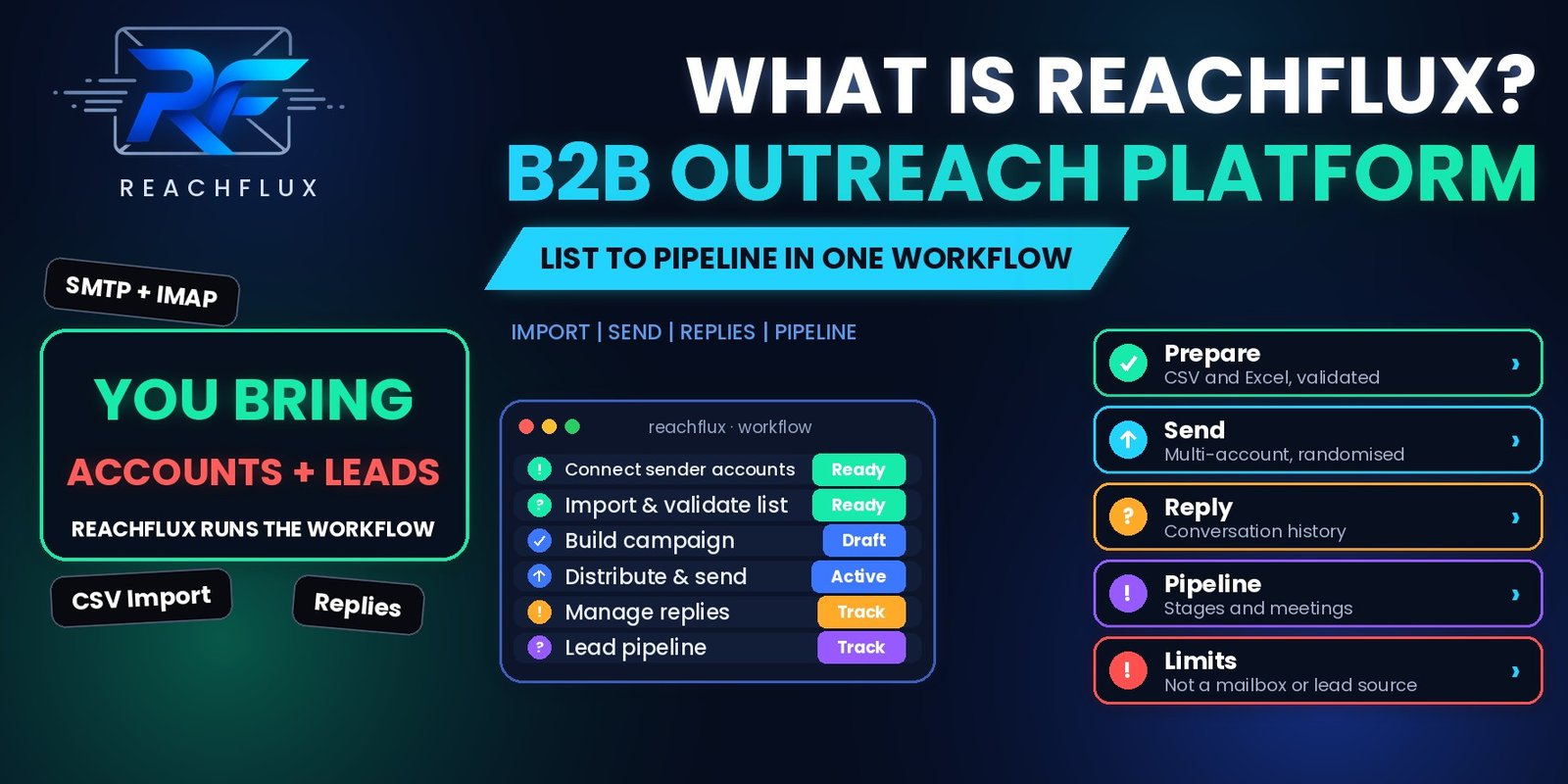
What is ReachFlux?
ReachFlux (reachflux.io) is a B2B email outreach platform. It brings cold email campaigns, multi-account sending, randomised delays, email validation, AI-assisted writing, reply management, lead tracking, analytics and meeting workflows into one workflow. You connect the email accounts you control, bring your own prospect data, and use ReachFlux to prepare lists, run campaigns, manage replies and follow opportunities through a pipeline.
Just as important is what it is not. ReachFlux is not a mailbox provider, it does not supply a database of leads, and it does not promise inbox placement or replies. Authentication, sender reputation and results still depend on your domains, mail providers, lists and message.
| At a glance | Details |
|---|---|
| What it is | A B2B email outreach platform for running and managing cold email campaigns |
| Website | reachflux.io |
| How it sends | Through your own SMTP email accounts, with IMAP used to bring replies back |
| Where leads come from | Your own CSV or Excel files; ReachFlux does not provide a contact database |
| Core jobs | List preparation, campaign sending, reply management, lead pipeline, analytics and meetings |
| What it does not do | Replace a mailbox provider, source leads, or guarantee inbox placement or replies |
Not every “flux” is ReachFlux
Several products and companies use the word flux in their names, and people searching for one sometimes land on another. ReachFlux is the email outreach platform at reachflux.io. If you were looking for a similarly named product, check the website address before you sign up for anything or compare features.
A useful test is the domain. The platform described on this page lives at reachflux.io, and everything said here refers to that product only.
How ReachFlux works, in eight steps
The workflow follows the way outbound actually runs, from connecting accounts to closing the opportunity.
Link the email accounts you are authorised to use. SMTP handles outgoing campaign mail and IMAP lets ReachFlux read and associate replies. Provider presets exist for supported common providers, with manual server details available.
Choose operating defaults such as greeting rotation, subject prefix and suffix options, and randomised delay ranges.
Import a CSV or Excel file from your own prospecting process. ReachFlux can detect the email column and prepare the list.
Validate addresses, choose sender accounts, write the message yourself or with AI assistance, and review it in rich text, plain text or HTML.
Campaigns process in the background, distributing recipients across connected accounts with the timing and variation controls you set.
See sending status, opens, clicks and replies. Opens and clicks are signals rather than guarantees.
Handle replies in context and move interested prospects through lead pipeline stages.
Schedule supported meetings through Google Calendar and keep invoicing and won-revenue context close to the conversation.
The full walkthrough is on the how it works page.
What a week of outreach looks like in one workflow
Features are easier to understand as a rhythm. Here is how a small team might run a week using a single workflow. It is a suggested pattern, not a fixed schedule.
Import the new lead file, let the platform detect the email column, and validate the addresses so only usable records move forward.
Set the sender accounts, choose delay ranges and variation options, write or draft the message, and preview it with real data before anything is sent.
Start the campaign. It processes in the background, distributing recipients across connected accounts, while you watch status and bounces.
Answer replies in context with the conversation history alongside, and move interested prospects into pipeline stages.
Look at replies and pipeline movement first, treat opens and clicks as supporting signals, and decide what to change next week.
What is inside the platform
List preparation
Flexible CSV and Excel import with email-field detection, followed by email validation, so you start from cleaner recipient data. The records remain the leads you supplied; ReachFlux does not generate or scrape them.
Campaign building
Write messages in rich text, plain text or HTML. The AI Writer can draft subject lines and email copy as a starting point that you review and edit before it enters a campaign.
Sending controls
Distribute recipients across connected sender accounts, set randomised delay ranges, rotate greetings, add subject prefixes or suffixes and use sender-specific signatures. These are practical controls, not a promise of inbox placement.
Replies and pipeline
Reply management with conversation history, lead stages, meetings and invoice context, so the follow-up stays attached to the conversation.
Analytics
Sending status, opens, clicks, replies, lead stages, values and won revenue, in a view that separates signals from outcomes. See the analytics page.
Who uses a platform like this
ReachFlux is aimed at teams that run outbound by email and want the operational pieces in one place instead of scattered across spreadsheets, sender accounts and inboxes. Its own pages describe several situations.
| Team | The problem it addresses | Where to read more |
|---|---|---|
| Startups and founders | Outbound that lives in a spreadsheet, a mailbox and a founder doing everything by hand | Startups |
| Agencies | More lead files, sender accounts, replies and opportunities spread across separate places | Agencies |
| Ecommerce brands | B2B outreach to retailers, distributors and corporate buyers, working from lead data you already own | Ecommerce |
| Larger teams | Consistent lead preparation, reply ownership, pipeline visibility and clear handoffs | Enterprise |
How ReachFlux fits with the rest of your stack
ReachFlux is deliberately focused. It does not present itself as a marketplace of thousands of integrations. The connections that matter for outreach are the sender accounts that power campaigns, the replies that stay attached to conversations, Google Calendar for authorised meeting scheduling, and the built-in lead pipeline.
Everything else stays where it belongs. Your mailbox provider keeps hosting your email. Your prospect data comes from your own research, referrals, directories, events, CRM or a specialist data provider. Your domains and authentication stay under your control. ReachFlux sits across those pieces and gives you a single place to run the campaign and manage what follows. The integrations page sets out the connections in more detail.
What ReachFlux does not do
Being clear about limits makes a tool easier to evaluate.
It is not a mailbox provider
You connect email accounts you are authorised to use. ReachFlux uses them to send campaign mail and read replies; it does not replace them.
It does not supply leads
Prospecting happens outside the platform. Bring your own list from research, referrals, directories, events, a CRM or a specialist data provider.
It does not guarantee results
No software can promise inbox placement or replies. Domains, authentication, list quality, targeting and the message still decide the outcome. The infrastructure side is covered in Cold Email Infrastructure: Domains, Inboxes, DNS and Sending Limits.
It is not an autonomous sales agent
AI assistance helps with drafting, but you review what leaves your account and you manage the conversations.
Common misconceptions about outreach platforms
“It writes and sends everything automatically”
AI assistance helps with drafting, but you review and edit the message and decide what leaves your account. It is a starting point rather than an autopilot.
“It will fix my deliverability”
No tool can. Authentication, domain health, list quality and relevance decide placement. A platform can help you pace and organise sending, which is a different thing.
“It finds leads for me”
Prospecting happens outside the platform. You bring the list, and the platform helps you prepare and use it.
“It is only for large sales teams”
Its own pages describe founders running outbound from a spreadsheet as well as agencies and larger teams. The common thread is wanting one organised workflow rather than scattered tools.
How to pilot any outreach platform properly
Judging a platform on a feature list is less reliable than judging it on a small real campaign. Whether you try ReachFlux or something else, a short pilot reveals how the workflow behaves under your own conditions.
Pick one segment and one offer so results are easy to interpret.
A pilot on a poor list tells you about the list, not the tool.
Send a small batch with careful pacing and watch bounces and replies closely.
Confirm replies come back into the workflow, follow-ups stop when someone answers, and the pipeline reflects what happened.
Judge the pilot by replies and workflow friction, not by opens, then decide whether to expand.
Setting up healthy infrastructure beforehand matters just as much as the tool. The foundations are covered in Cold Email Infrastructure: Domains, Inboxes, DNS and Sending Limits and How Many Domains and Inboxes Do You Need for Cold Email Outreach?.
Questions to ask about any outreach platform
Whether you choose ReachFlux or something else, these questions separate tools that help you run outreach from tools that simply send emails.
- Does it work from the lead data and email accounts you already have?
- Does it help you validate lists before sending?
- Can it spread sending across several accounts within sensible limits?
- Does it control timing and variation rather than sending in bursts?
- Do follow-ups stop when someone replies?
- Are replies and pipeline in one place?
- Is it honest about what it cannot guarantee?
- Are plan limits and pricing easy to find?
A fuller version of this checklist, with the reasoning behind each question, is in Outreach Automation for Ecommerce Brands: What to Look For and How to Keep Follow-Ups Consistent.
Before your first campaign
A platform cannot fix weak foundations. Before sending, set up a dedicated outreach domain with SPF, DKIM and DMARC passing, validate your list, and start with conservative volume. The reasoning is in Primary Domain vs Cold Email Domain: Which Should You Use for Outreach? and Cold Email Deliverability Checklist: 25 Things to Check Before Sending. For current plans and trial terms, see the pricing page.
Questions about ReachFlux
What is ReachFlux?
ReachFlux is a B2B email outreach platform at reachflux.io. It combines cold email campaigns, multi-account sending, randomised delays, email validation, AI-assisted writing, reply management, lead tracking, analytics and meeting workflows in one workflow.
What does ReachFlux do?
It helps you prepare a lead list, validate addresses, send campaigns across connected email accounts with timing and variation controls, manage replies, and move interested prospects through a lead pipeline.
Is ReachFlux a mailbox provider?
No. You connect email accounts you are authorised to use. SMTP handles outgoing campaign mail and IMAP lets ReachFlux work with incoming replies.
Does ReachFlux provide leads or a contact database?
No. You bring your own prospect data, for example from research, referrals, directories, events or a CRM, and import it as a CSV or Excel file.
Does ReachFlux guarantee inbox placement?
No. Its controls, such as randomised delays and subject and greeting variation, support responsible sending, but deliverability still depends on your domains, authentication, list quality and message.
Which email accounts can I connect?
Accounts that support SMTP and IMAP. ReachFlux offers provider presets for supported common providers, and you can enter server details manually.
Is ReachFlux the same as other products with flux in the name?
No. ReachFlux is the platform at reachflux.io. If you were looking for a similarly named product, check its website address.
Where can I see ReachFlux pricing?
The pricing page lists the current plans and terms.
A workflow for outbound, not a promise about results.
ReachFlux exists to connect the operational pieces of outbound that tend to get scattered: the lead file, the sender accounts, the campaign, the replies and the pipeline. It is designed to be honest about its limits, which is why it leaves sourcing leads, hosting mailboxes and guaranteeing placement to other parts of your stack.
If that matches how you run outreach, the next step is to look at the workflow itself.
Walk through how a campaign moves from list to pipeline.
The how it works page shows each step, from connecting accounts to closing an opportunity.