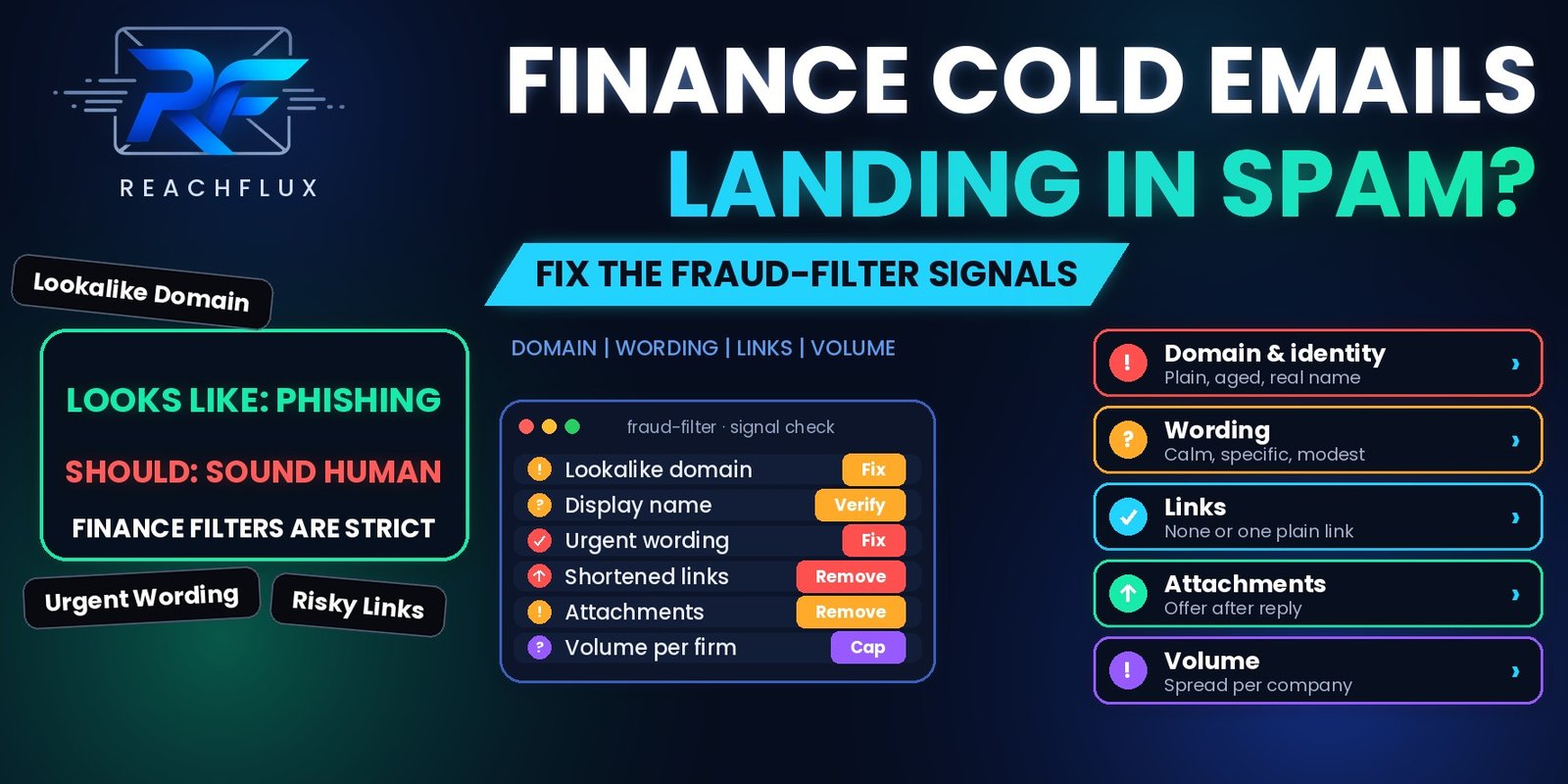
Why do finance cold emails land in spam?
Finance cold emails land in spam for two reasons stacked on top of each other. The first is the usual list: incomplete authentication, a new or poorly warmed domain, bad data, and sending too much too fast. The second is specific to money. Banks, insurers, lenders and payment companies are among the most impersonated brands on the internet, so the filters guarding financial inboxes are trained to distrust anything that smells like a lure: urgent wording, unfamiliar links, attachments, and senders who sound more official than they are.
That second layer is good news in one way, because most of it is made of things you control. You can write a message that does not pattern-match to fraud, send it from an identity that does not imitate anyone, and pace it so one company's gateway never sees a burst from a stranger. This guide walks through nine causes in the order worth checking them, and what to change for each.
Why financial inboxes are harder to reach
Think about what a filter at a regional bank has seen. Years of fake invoices, fake payment notices, fake account alerts and fake executive requests for an urgent transfer. Every one of them used financial language plus a link or an attachment. The defences built against those attacks do not know your email is a polite note from a real adviser. They only know its shape.
Three things make the environment stricter than a typical business inbox. Many financial organisations route mail through a secure email gateway with rules written by their own security team rather than by Gmail or Microsoft defaults. Staff are trained to report anything suspicious, and one “report phishing” click carries more weight than you would expect. And impersonation protection is tuned tightly, so a display name or domain that resembles a bank, a regulator or an internal executive gets flagged fast.
None of this closes finance to cold outreach. It just shrinks the margin for sloppiness.
Corporate filtering is its own subject. For the mechanics behind it, read How to Get Cold Emails Past Corporate Spam Filters and Secure Email Gateways.
Nine reasons finance cold emails end up in spam
Work through these in order. The earlier ones are the cheapest to check and the most common to get wrong.
1. Authentication is missing, incomplete or misaligned
SPF, DKIM and DMARC are the entry ticket, and for financial recipients they are closer to a hard requirement. A gateway can quarantine mail that fails DMARC, or whose visible From domain does not align with the domain that passed SPF or DKIM. Send a real message to a test mailbox, open the full headers and confirm all three show a pass for the domain in the From line. If one fails, stop and fix it before touching anything else. The details are in SPF vs DKIM vs DMARC.
2. The domain is new, thin or looks like someone else's
A brand-new domain has no history, and a domain wearing words like secure, bank, pay, trust or verify looks like a lookalike. It is tempting to pick a name that sounds trustworthy to a finance audience. Do the opposite. Choose a plain variation of your real company name, age it, and warm it gradually. Never use a name that resembles a bank, a card network or a regulator, even loosely.
3. The display name claims authority you cannot back up
Labels such as “Account Services”, “Compliance Desk”, “Security Team” or “Payments Support” are classic impersonation patterns. Use a real person's name and a real role, and make sure the signature matches the sender.
4. The copy reads like a lure
Urgency (“act now”, “within 24 hours”), requests to verify or confirm something, promises of guaranteed returns, and heavy use of currency symbols and percentages all resemble scam templates. Financial professionals also see plenty of genuine regulated promotions, so claims about returns attract compliance attention as well as filter attention. Write about the problem you solve, in calm sentences, with one modest ask.
5. The links look risky
Link shorteners, long tracking URLs on a domain unrelated to your sender, several links in a short message, and link text that shows one address while pointing at another are all things gateways rewrite or block. In a first email to a financial prospect, use no link or one plain link on a domain you control. Links in cold emails covers the trade-offs.
6. Attachments and “secure message” tricks
A PDF deck in a first email, or a “view secure document” button, is exactly what phishing kits send. Attachments are also opened in sandboxes, which can delay or remove your message. Offer the material after they reply.
7. The list is full of role inboxes and stale contacts
Finance moves through mergers, restructures and job changes, so contact data decays quickly. Role addresses such as info, compliance or support are also common sources of spam traps and complaints. Bounces and traps damage the sender reputation every filter consults. Verify the list, drop role addresses, and prefer named people. If your data comes from a purchased database, read Why Do Half of Your Prospect Emails Bounce? Fixing Bad Data From Paid Databases and LinkedIn.
8. Volume lands on one organisation all at once
Ten emails to ten people at the same bank in an hour look like a campaign to that bank's gateway, because that is what they are. Cap how many messages go to a single recipient domain per day and spread them over several days. This limit is separate from your per-inbox limits, and many senders forget it entirely. See Cold Email Sending Limits: How Many Emails Should You Send Per Day?.
9. Opt-outs and complaints are mishandled
If a recipient cannot easily say no, they will press the spam button, and at a financial firm they may also report you internally. Honour opt-outs immediately across every campaign and keep a suppression list. The mechanics are in Cold Email Compliance and Deliverability: Opt-Outs, Sender Identity and Complaint Rates.
What a fraud-aware filter reads, and what to do instead
It helps to translate each part of your email into what a fraud-aware filter sees. Most fixes fall straight out of the right-hand column.
| Element | What a fraud-aware filter reads | Safer approach |
|---|---|---|
| Sending domain | Lookalike words, very recent registration, no history | Plain variation of your brand name, aged and warmed gradually |
| Display name | An authority-style label with no person behind it | A real name and role that matches the signature |
| Subject line | Urgency, account wording, money amounts | A short, specific subject in plain words |
| Body wording | Verify or confirm requests, guaranteed outcomes | One calm paragraph about a relevant problem and a modest ask |
| Links | Shorteners, mismatched domains, several links | No link, or one plain link on a domain you control |
| Attachments | Documents that must be opened to understand the message | Nothing attached; offer material once they reply |
| Sending pattern | A burst of similar messages to one organisation | Small, spread-out batches per recipient domain |
If you work in a regulated business, involve compliance early
Outreach rules differ by country and by what you are selling, and financial services add their own layer. In some jurisdictions financial promotions must follow specific content and approval rules, and firms often have to keep records of outbound communications. This is not legal advice, but the practical point stands: agree your first email and follow-up templates with whoever signs off marketing communications before you send at scale. Doing that once is far cheaper than rewriting a campaign after a complaint.
A few baseline habits help compliance and deliverability at the same time. Identify yourself and your company honestly, give people a simple way to opt out, avoid performance claims and guarantees, and keep a record of who asked not to be contacted. The guide to compliance, opt-outs and deliverability explains how those pieces fit together.
A sending setup that suits financial audiences
None of this needs exotic tooling. It needs a deliberately boring setup that gives filters nothing unusual to react to.
Use a dedicated outreach domain plainly tied to your brand and not to anyone else’s.
SPF, DKIM and DMARC pass and align on a real test message.
Build volume over weeks rather than hitting financial recipients from a cold start.
Limit sends to any single recipient domain each day.
Read bounce text and replies grouped by recipient domain.
Not sure whether to use your main domain at all? Start with Primary Domain vs Cold Email Domain: Which Should You Use for Outreach?.
How to write a finance cold email that does not resemble phishing
Most finance cold emails fail the read-aloud test. Say the message out loud. If it sounds like an advertisement, or like a notice from an institution, it will probably be treated like one. Here is the contrast in practice.
| Part of the email | Risky version | Safer version |
|---|---|---|
| Subject | URGENT: action required on your account | Question about how your team handles vendor payments |
| Opening | Dear valued client, we have identified an opportunity for you | Hi [first name], I saw that [company] is hiring a finance operations lead |
| Claim | Guaranteed returns, limited places | We help finance teams cut manual reconciliation time; happy to explain how if it is relevant |
| Call to action | Click here to verify your eligibility | Would a short call next week be useful, or shall I send a one-page summary? |
| Format | Heavy HTML, banner image, three links, PDF attached | Plain, personal layout with one signature and no attachment |
The safer column is not clever. It simply sounds like one person writing to another about something specific, which is exactly what a filter and a busy finance manager both hope to see.
How to find which cause is hurting you
If results are already poor, resist the urge to rewrite everything. Isolate the cause, because the fix for a gateway problem is different from the fix for a list problem.
Send to your own mailbox at a provider, open the original message and confirm SPF, DKIM and DMARC pass and align with the From domain.
Group bounces and replies by the prospect’s organisation. If trouble is concentrated at a few financial firms the cause is probably their gateway; if it is everywhere, look at your own setup.
Responses in the 5.7.x family usually mean the receiving server refused the message on policy, reputation or authentication grounds, and many say which.
Send a plain version with no links or attachments. If placement improves, add elements back one at a time to find the culprit.
Write down every change with a date so you can tell what helped. The method in Cold Email Spam Troubleshooting: How to Diagnose Why Outbound Emails Land in Spam works well here.
Pre-send checklist for financial services outreach
- SPF, DKIM and DMARC pass and align on a real test message.
- The sending domain is dedicated, aged and does not resemble any bank, brand or regulator.
- The display name is a real person whose role matches the signature.
- The subject and body avoid urgency, verification requests and guarantees.
- The first email has no attachment and zero or one plain link.
- The list is verified, role addresses removed and named people preferred.
- Daily volume to any single recipient domain is capped and spread over days.
- Compliance has approved the templates and opt-outs are honoured everywhere.
Questions about finance cold emails and spam
Why do my finance cold emails go to spam when other industries are fine?
Financial brands are heavily impersonated, so the filters and gateways around financial inboxes are tuned for fraud patterns. Authentication gaps, risky wording, links, attachments and sudden volume to one organisation are all penalised more strongly than elsewhere.
Do words like loan, investment or credit automatically trigger spam filters?
Not on their own. Modern filters weigh context: urgency, guarantees, links, sender reputation and authentication matter more than any single word. Plain, specific wording about a real business problem is rarely the cause.
Should I use my main company domain to email financial prospects?
Generally no. Cold outreach carries complaint and bounce risk you do not want attached to the domain your staff and customers rely on. A separate domain that is plainly related to your brand protects the main one.
Can I attach a deck or one-pager to my first email?
It is safer not to. Attachments are a common phishing vector and are often scanned or held by gateways. Offer to send the material once the person replies.
How many emails per day can I send to one bank or firm?
There is no universal number because it depends on that company's gateway and your own reputation. Keep it low, spread it over several days, and watch bounce text and replies for that recipient domain before increasing.
Do I need compliance approval for financial outreach?
Often yes if you are a regulated firm or promoting a regulated product, but the rules depend on your country and activity. Ask your compliance lead or a qualified adviser, because this guide is not legal advice.
Finance is not closed to cold email. It is just less forgiving.
The filters around financial inboxes exist for good reasons, and they punish the habits that fraudsters share with careless senders: borrowed authority, urgency, risky links and sudden bursts. Remove those habits and you are left with what a real adviser sounds like, which is calm, specific and easy to answer.
Start with authentication and the domain, then fix the copy, then pace the sending by recipient organisation. Change one thing at a time, read the bounce text, and let replies tell you whether it worked.
Validate lists, distribute sending and manage replies in one workflow.
ReachFlux helps teams prepare lists, pace campaigns across sender accounts and keep replies organised.